TrackDyno

Road dyno & performance timer for iPhone

Your iPhone is the dyno.

Measure horsepower, torque, 0–60, quarter-mile, braking and lap times with the sensors already in your phone. Plug in a Bluetooth OBD-II adapter and TrackDyno reads RPM and speed straight from the engine computer.

$14.99 · One purchase, no subscription · iPhone and iPad, iOS 17 or later

Peak power346hpat 5,440 rpm
Peak torque372lb-ftat 4,320 rpm
Pull · 3rd gear
Example dyno sheet Power and torque against engine RPM from an example pull. Power peaks at 346 horsepower at 5,440 rpm, torque peaks at 372 pound-feet at 4,320 rpm, and the curves cross at 5,252 rpm. 2,0003,0004,0005,0006,000100200300400ENGINE RPM 5,252 crossover
Power, hp Torque, lb-ft SAE J1349 corrected · Example pull
Dyno pullsHorsepower and torque curves against RPM
Acceleration0–60, 0–100, ⅛ and ¼ mile with trap speed
BrakingStopping distance, peak g, wheel lockup
Lap timingSectors, session bests and full replay

01 · Dyno

Horsepower and torque from one pull.

Pick a gear, roll on, floor it. TrackDyno works out the force it took to accelerate your car through the air and turns it into a power and torque curve against engine RPM. Every result is corrected to standard conditions, so a hot day and a cold day can be compared fairly.

  • CorrectionSAE J1349 air density from live weather, with the phone's barometer as a fallback
  • Road gradeMeasured with the barometer and taken out of the result
  • RPM sourceOBD-II, or your engine's sound after a one-time microphone calibration
  • Auto-startWith OBD-II, the pull starts when you hit wide-open throttle
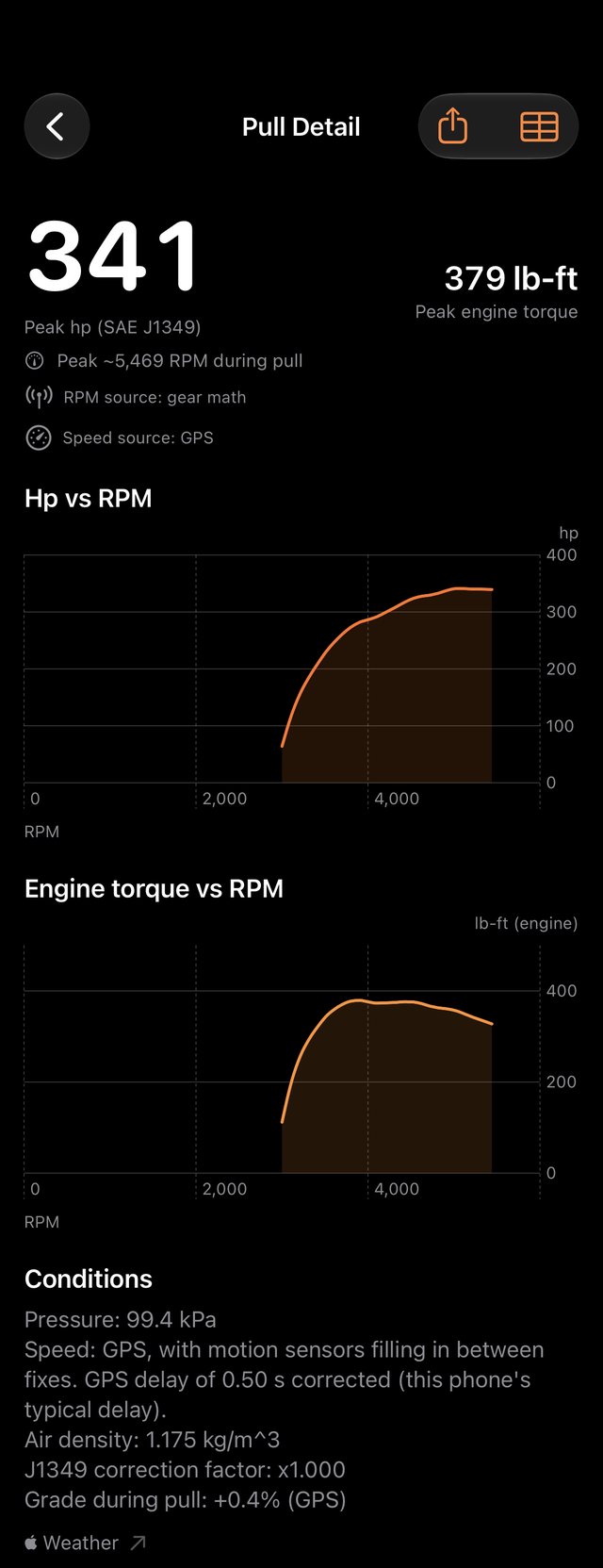
TrackDyno Pull Detail screen for a VW Arteon: 341 hp peak (SAE J1349) and 379 lb-ft peak engine torque, horsepower and torque curves against RPM, and the conditions used for the correction

02 · Acceleration & distance

Your own timeslip, anywhere it's legal to run.

Launch from a stop and TrackDyno times the standard benchmarks automatically. GPS sets the distance and speed. The motion sensors fill in between GPS fixes, and the app corrects for your phone's GPS delay, so the clock starts when the car moves.

  • From a stop0–60 mph, 0–100 km/h, 0–100 mph
  • Distance⅛ mile and ¼ mile, elapsed time and trap speed
  • RollingIn-gear roll-ons from 20–40 to 100–120 mph, plus metric splits
  • Peak gLongitudinal and lateral

03 · Braking

Stopping distance, and whether the wheels locked.

Brake from speed and TrackDyno measures how far the car took to stop and how hard it decelerated. With an OBD-II adapter it also compares wheel speed from the car with ground speed from GPS. If the wheels stop while the car is still moving, the run is flagged as a lockup.

  • MeasuresDistance and time for 60–0 mph, or 100–0 km/h in metric
  • Peak decelIn g, from the motion sensors
  • LockupFlagged when wheel speed drops well below ground speed (OBD-II)
60–0 mph124ft
Peak decel1.08g
Time2.71s
LockupNone
Example braking trace Speed falls from 60 mph to a stop in 124 feet. The shaded band shows deceleration, peaking at 1.08 g. 020406080100120204060DISTANCE, FTMPH stop · 124 ft

Speed (white) and deceleration (orange) · Example stop

04 · Lap timing

Every lap, every sector, replayed.

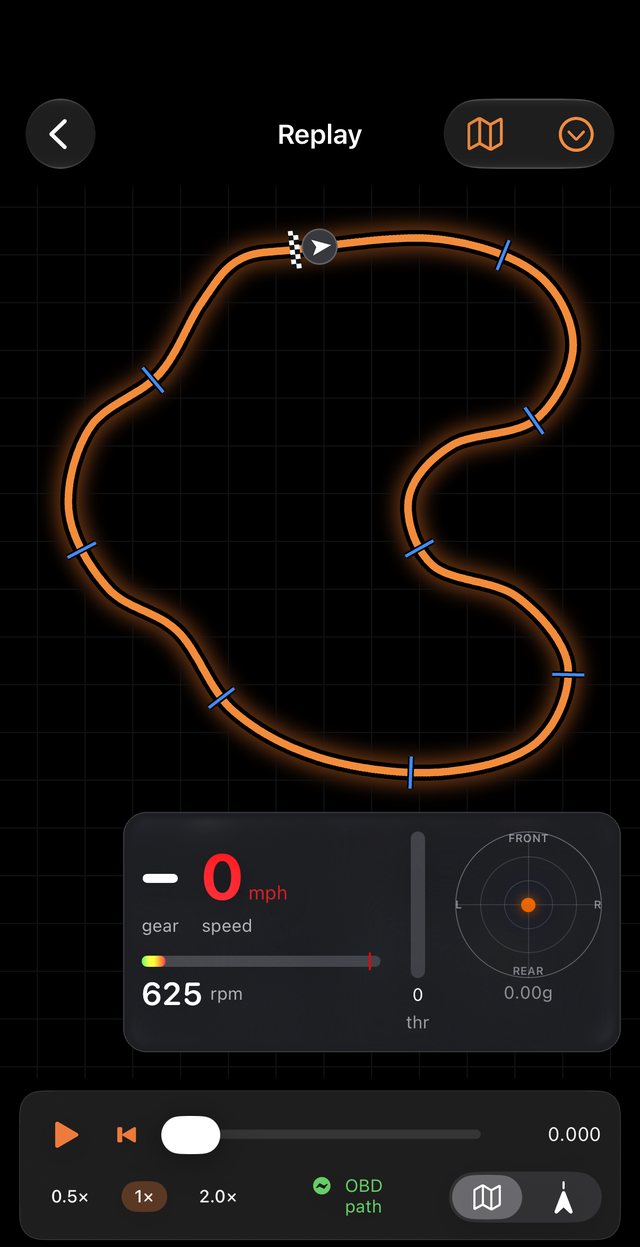
Lay out a track once with its start line, finish line and sectors, then save it to your library. TrackDyno times every lap and splits it into sectors. Afterward you can replay the lap on the map with speed, gear, RPM, throttle and g-force.

  • TracksYour own library. Share layouts with friends as a file
  • SectorsPurple for the session best, green for your personal best
  • ReplayRacing line with telemetry, at 0.5×, 1× or 2×
TrackDyno lap replay showing the track outline with start line and sector markers, plus live gear, speed, RPM, throttle and g-force

How it measures

Physics first, with every input on the table.

A chassis dyno measures the force at the rollers. TrackDyno measures what that force did to your car on the road: how fast it gained speed, against its own weight, air drag and tire drag.

Speed

GPS + motion sensors

GPS sets the speed and the motion sensors fill in between fixes. TrackDyno learns your phone's GPS delay and corrects for it.

Air & grade

Weather + barometer

Temperature, pressure and humidity give the air density. The barometer tracks climbs and descents during the run.

RPM

OBD-II or microphone

Read RPM from the engine computer, or calibrate the mic at idle, 2,000 and 3,000 rpm and TrackDyno follows the engine's pitch.

Gearing

Your real ratios

Every gear ratio, the final drive and tire size turn speed into engine RPM. With OBD-II, TrackDyno detects the gear and checks it against your entries.

Accuracy comes from your vehicle data. Weight, gearing, tire size and drag all feed the math, so the setup assistant asks for every one of them and doesn't accept guesses. Results are estimates. Use them to compare your own runs and modifications, not as a certified chassis dyno figure.

Optional · OBD-II

Works on its own. Better with OBD-II.

You don't need any hardware to use TrackDyno. Add a Bluetooth Low Energy OBD-II adapter and the app reads engine RPM, vehicle speed, throttle, pedal position and gear directly from the car. That means cleaner curves, gear detection, auto-start at wide-open throttle and wheel-lockup checks.

iPhone can only talk to Bluetooth LE (4.0+) or Wi-Fi adapters. That's an Apple limit that applies to every app. Look for "BLE" or "works with iPhone" on the listing.

Known to work

  • Vgate iCar Pro BLE
  • Vgate iCar 2S
  • vLinker MC+
  • OBDLink CX
  • Veepeak BLE+
  • Panlong BLE

Won't work

  • Classic-Bluetooth ELM327
  • OBDeleven
  • Carly
  • BlueDriver

Proprietary adapters are locked to their own apps. Any generic ELM327-compatible BLE adapter should work. TrackDyno detects the adapter's layout automatically.

Find out what it really makes.

  • $14.99, once
  • No subscription
  • No ads
  • No account
  • Runs sync through your own iCloud
Download on the App Store

iPhone and iPad · iOS 17 or later